Building Toner
Toner, a personal app that I worked on, is a free vocal pitch trainer that runs in the browser. You open the site, allow microphone access, and sing along as notes fall toward a play line. Toner listens while you sing and shows how close your voice is to the note you are supposed to hit.
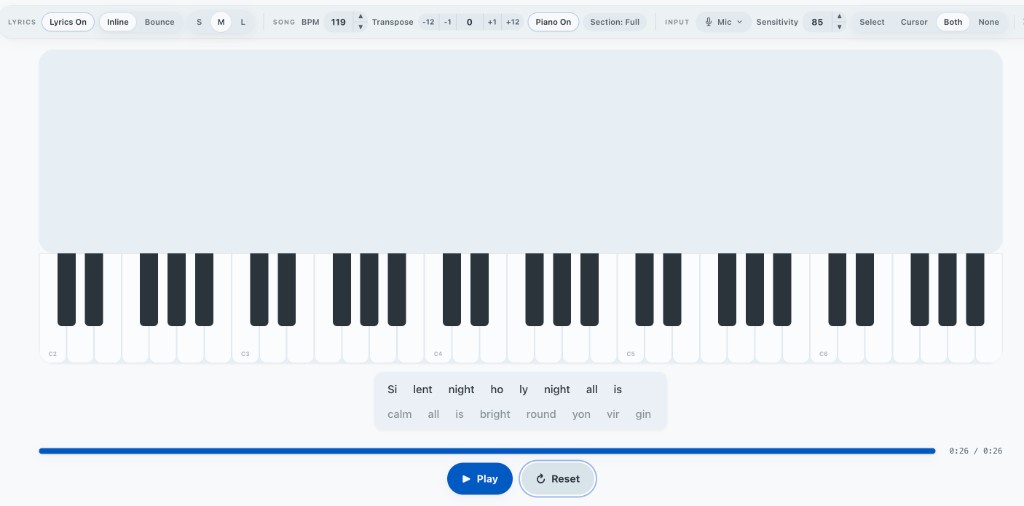
I originally built it because I wanted to get better at singing, but whenever I looked online for pitch training, most of the options either cost more than I was willing to pay at the time or felt like cash grabs.
I started working on Toner near the end of 2024 during my freshman year of college. The first version was pretty simple, with a piano, microphone pitch detection, and notes moving down the screen. Then life got ahead of me and I took some time away from it. When I came back, better AI coding tools made it much more practical to build something larger by myself. From there, Toner slowly grew from that original practice screen into a larger app with a composer, vocal range testing, lessons, lyrics, and score breakdowns.
At a high level, the core loop behind it all is pretty simple. Toner reads audio from your microphone, estimates the frequency of your voice using a library called Pitchy, turns that frequency into a musical note by checking against an in-memory table, and compares it against whatever note you are supposed to be singing.
At the same time, notes fall toward a piano on the screen. When one reaches the bottom, Toner plays the associated piano sample so you can hear the target pitch too, which I found to be a pretty helpful reference.
Getting all of these things to happen at once was one of the first places where the architecture started to matter.
Handling Duplex Audio
The early version of Toner would sometimes stutter while capturing the user's pitch or play the piano reference note late.
At the time, the part of the app controlling the falling notes also handled its own audio playback. Whenever a note reached the play boundary, it would fetch the corresponding MP3 file, read it into memory, decode it, and then start playback. At the same time, another loop was continuously reading microphone samples, running pitch detection, and updating the UI to display the active note based on the user's input.
In all, this meant that the browser could end up doing network work, audio decoding, pitch calculations, animations, and UI updates at roughly the same time and with much of the application-side work happening on the same JavaScript thread.
This was surprising to me because obviously applications like Google Meet can handle audio input and output at the same time without falling apart.
Looking deeper, I found that the Web Audio API already handles the final audio rendering separately. The problem was not really JavaScript generating the sound itself. The problem was all the application work that had to happen before the sound could even be scheduled.
To fix this, I reorganized Toner around one shared audio manager. Instead of different parts of the app creating and managing their own audio systems, microphone capture and piano playback now share one Web Audio context.
The microphone and piano still follow separate paths. Microphone audio goes into the analyser used for pitch detection and never reaches the speakers. Piano samples take a separate path out to the speakers. Keeping those paths separate prevents the singer's microphone input from feeding back through the output.
Another important change was caching decoded piano samples. Once Toner loads a note, it keeps the decoded audio in memory. Playing that note again no longer requires another network request or another decode. Toner can just look up the existing sample and play it.
That removed fetching and decoding from the part of the system where timing mattered most.
Where WASM Works and Where It Doesn't
Another hypothesis I tested was whether pitch detection itself needed more optimization.
Pitch detection runs every animation frame and does numerical work over thousands of audio samples, so WebAssembly seemed like something worth trying.
I tested aubiojs, a WebAssembly build of the aubio audio library, against Pitchy, which Toner was already using. The benchmark used synthetically generated audio split into arrays of samples. For each buffer, I measured how long each detector took to return a pitch.
Pitchy averaged roughly 0.125 milliseconds per pitch detection. Aubio's fastest option that I tested, YINFFT, took roughly 0.20 to 0.23 milliseconds per detection.
The JavaScript implementation was actually around 1.6 times faster.
My hypothesis ended up being wrong, but the experiment taught me something more useful about WASM. There is still a cost to crossing between JavaScript and WebAssembly and moving data into WASM memory. If the individual piece of work is already extremely small, that overhead can eat into the performance benefit you were hoping to get.
For Toner, each pitch detection only took a fraction of a millisecond anyway. There was not really a performance problem to solve.
It gave me a much better intuition for where WASM makes sense. It becomes more interesting when you can hand it a larger chunk of computational work instead of constantly crossing the boundary for tiny operations.
Algorithms in the Wild
One of the larger features I added later was Create, which is essentially a simplified UI for making music that can be played within the website and exported for use elsewhere.
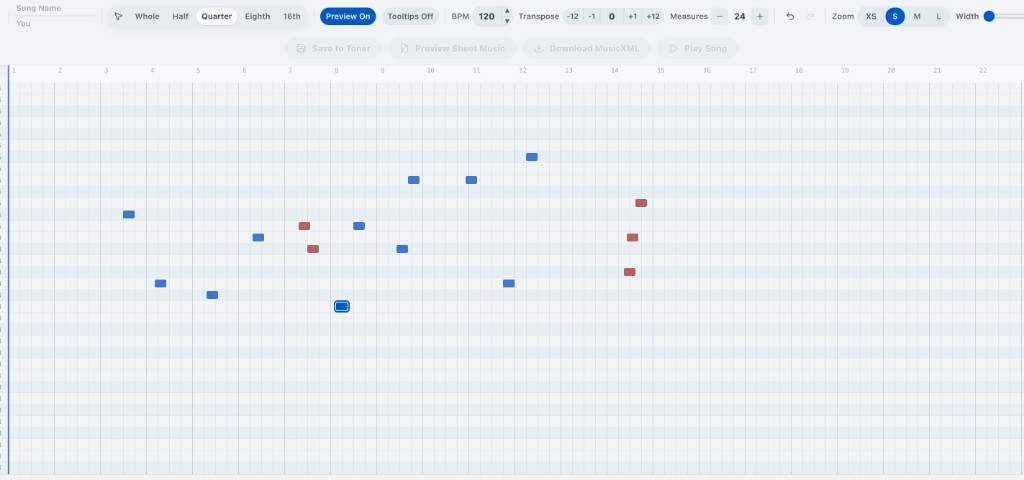
For a song to be playable in Toner, only one note can be active at a time so that pitch detection knows which note to expect. With that in mind, two notes in the editor should not occupy the same section of time.
That means whenever someone drags a note, resizes one, pastes something, or imports a song, the editor has to check for overlaps and highlight them so the user knows that section is unplayable.
The simplest way to do this would be to compare every note against every other note.
That works, but it also means potentially doing roughly n² comparisons.
Looking at the problem, each note basically has a start and an end time, which maps pretty naturally onto the kind of interval problems that show up in algorithms classes.
Toner sorts the notes by their starting position and walks through them from left to right. For each note, it checks the notes after it until it reaches one that begins after the current note has already ended. Once that happens, it can stop because every remaining note starts even later.
Sorting the notes takes O(n log n), and in normal songs this lets us skip most of the comparisons that a naive pairwise scan would make. The worst case can still become quadratic if a huge number of notes all overlap, but that is also the case where there are actually a huge number of conflicts to find.
Realistically, most songs are never going to have enough notes for the naive approach to become some massive bottleneck anyway. It was still a cool opportunity to see an algorithms problem show up naturally in something I was building.
Navigating Race Conditions
Pun intended.
Another problem showed up once Toner had enough pages that I wanted animated transitions between them.
The first visit to a page looked fine. The current page would fade out, navigation would happen, and the new page would fade in. But on later visits, the new page would sometimes flash onto the screen before the transition happened, which made the whole thing look pretty glitchy.
As it turns out, Next.js caches routes, and this was how I found out.
Originally, navigation and the animation were mostly independent. On a cold route, loading took long enough that the cover animation happened first anyway. On a cached route, Next.js could replace the content almost immediately.
So there was effectively a race between navigation and the transition.
The fix was to make navigation itself part of the animation.
The page transition module now intercepts an internal navigation before it happens. It first fades an opaque layer over the current page. Once that layer completely covers the screen, navigation begins. The new page renders underneath it, the browser gets a moment to paint the new content, and then the cover fades away.
Instead of trying to make the animation fast enough to beat navigation, navigation now just waits for the animation.
The Reddit Incident
Eventually, I wanted to share Toner with a broader group of people, so I made a post on Reddit in the Internet Is Beautiful community.
The post got around 60,000 views overnight.
Everything was great until I checked Vercel.
Toner had generated more than 800,000 edge requests. The number was climbing by the thousands every time I refreshed the dashboard while more than 50 people were actively using the site.
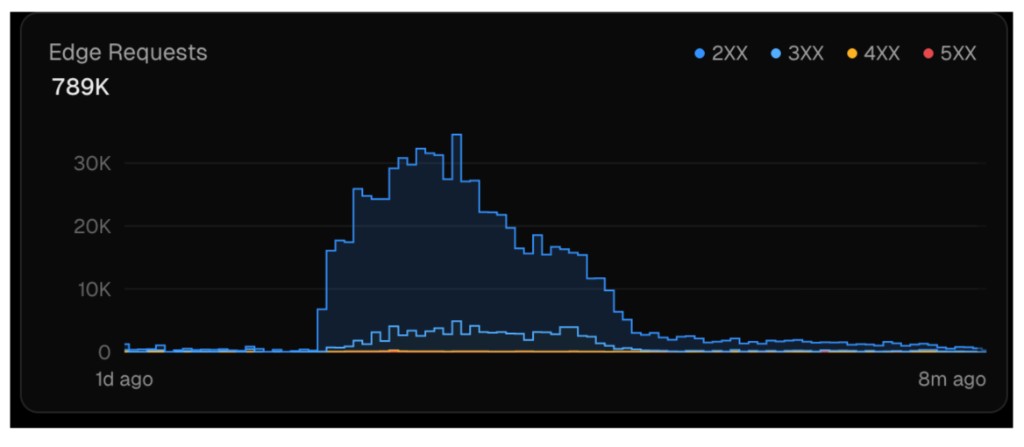
Way too many requests.
With my Vercel free tier getting pushed closer to its limits and the site suddenly having more momentum than it ever had before, I started looking into where all of those requests were actually coming from.
There were two main problems.
The first was Next.js route prefetching. Toner's homepage linked to Learn, Range, Create, and a few other pages. Next.js would automatically prefetch those routes so that if someone clicked one later, navigation would feel faster.
That is pretty reasonable with a small amount of traffic. With tens of thousands of visitors, it meant people were generating requests for pages they might never even open, so I disabled it.
The much larger problem was piano samples.
The first version of the audio cache downloaded around 88 MP3 files when the page first loaded. The thinking was that every possible piano note would already be available by the time playback started.
That sounded nice when I built it, but most songs only use a small set of pitches.
Also, media egress is expensive.
I redesigned the cache so that it starts empty. When someone presses Play, Toner looks at the selected section of the song, finds the unique pitches it actually uses, applies the current transposition, and preloads only those notes.
Most songs end up needing around 10 to 20 samples instead of 88. If Toner encounters another pitch later, it loads that one on demand.
The samples also use long-lived immutable cache headers, so once the browser downloads a piano sample it can typically reuse it later without another request, including across later visits.
Between lazily loading the audio and disabling route prefetching, a representative page load went from roughly 178 requests to around 18, which was close to a 90% reduction. Transferred data went from roughly 483 kB to 396 kB, which was around a 20 % reduction.
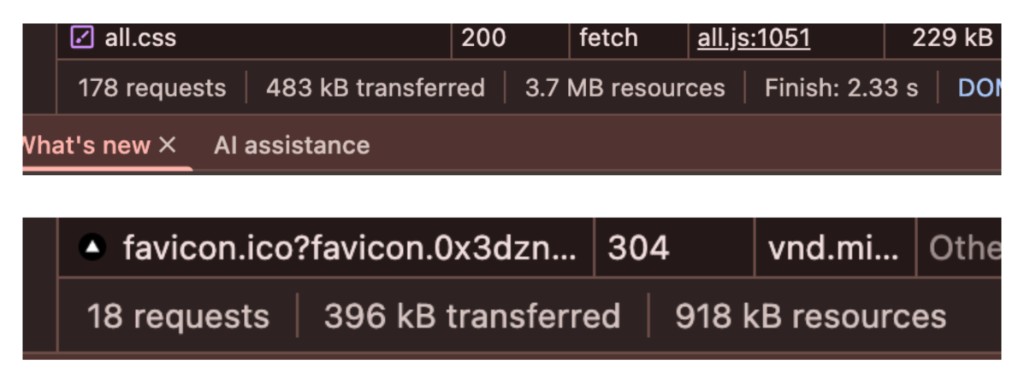
It was a pretty cool example of how decisions that barely matter with ten users suddenly become very noticeable when you multiply them by tens of thousands.
Where It Is Now
Toner started as a small tool I wanted for practicing singing and slowly turned into a much larger project than I initially had in mind.
While I don't actively work on it anymore, the site is still available at usetoner.com.
Feel free to try it out and let me know if you have any feedback!